
.svg)
.svg)

Recruiting teams now sift through 3.5 times more applications than just a few years ago, according to Greenhouse data reported by the Associated Press. One-click résumé blasters and AI cover-letter generators make every paragraph sound the same. A 2025 study of a freelance marketplace by economists Jingyi Cui, Gabriel Dias and Justin Ye found that an AI writing tool raised individual callback rates, yet the link between a tailored cover letter and a callback fell 51 percent once the tool spread. Your challenge: use automation without fading into the noise.
Below, we rank the seven best auto-apply job tools for human-sounding cover letters, scoring each on writing quality, match accuracy, review control, privacy, and real cost.
Job applications are easier to send and harder to make memorable
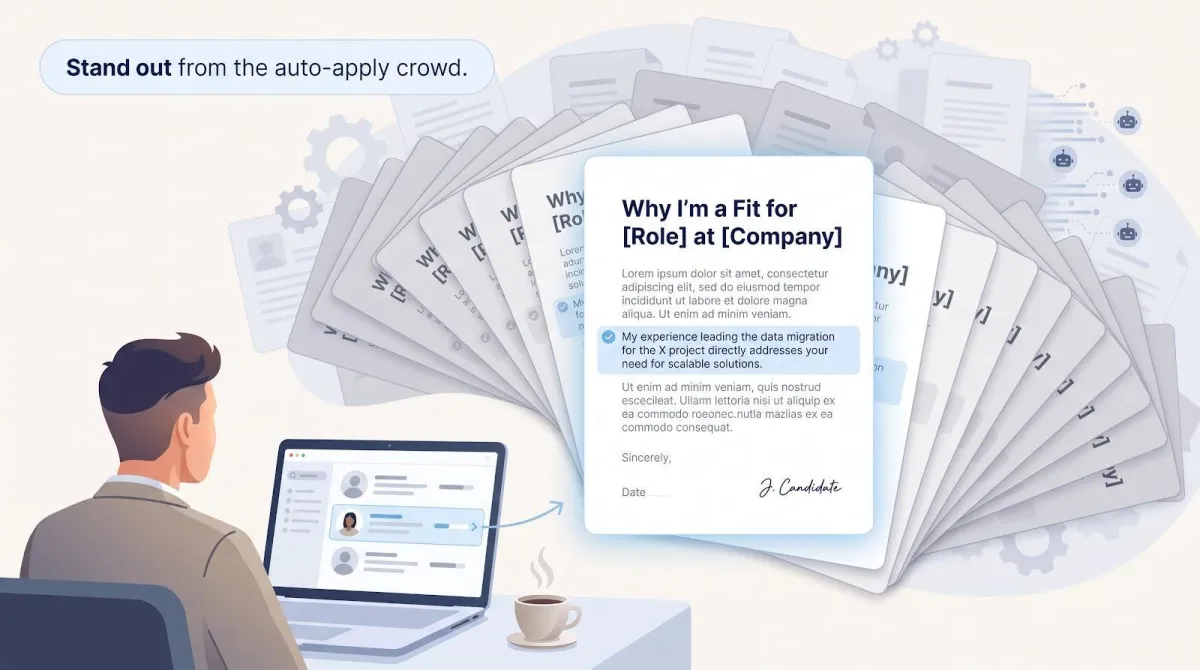
One-click tools let you apply to 100 openings before your second coffee, yet recruiters now sort about 3.5 times more applications than a few years ago, according to Greenhouse data reported by the Associated Press. Every extra résumé cuts the time they spend on yours.
Automation crowds the cover-letter lane, too. The same 2025 study by Cui, Dias and Ye found that AI help raised individual callback odds, yet the link between a tailored letter and a callback fell 51 percent once the tool spread. When every paragraph sounds perfectly polished, none sound personal.
That trade-off defines today’s search: we want speed, yet we need distinct, factual stories. The seven tools below promise both volume and letters that still sound like you.
The seven best tools at a glance
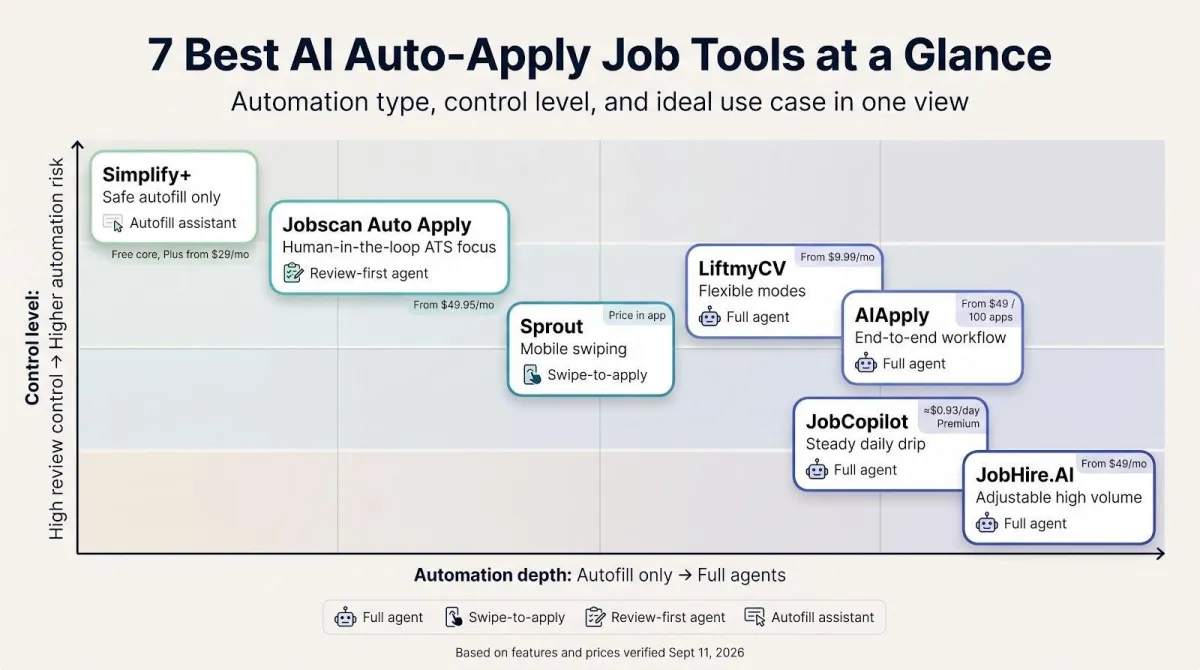
Need a quick comparison? The grid below matches each auto-apply tool to its ideal use case, shows how much control you keep, and lists the lowest verified price on September 11, 2026, starting with the AIApply tools, the best AI job automation tool of the seven.
| Rank | Tool | Best for | Automation type | Review gate | Per-job docs | Stated daily volume* | Lowest price† |
| 1 | AIApply | End-to-end workflow | Full agent | Review before send, or full automation | Yes | Credit based, no published cap | Subscription + credit packs (100 or 250) |
| 2 | LiftmyCV | Flexible modes | Full agent | Four modes | Yes | Credit-based | Pay-as-you-go, about $0.05 per apply |
| 3 | Jobscan Auto Apply | Human-in-the-loop ATS focus | Review-first agent | Mandatory | Answers + letter | User-set | $49.95 mo suite |
| 4 | Sprout | Mobile swiping | Swipe-to-apply | Post-submit view | Yes | 80-600 / month | $19.99 mo (80 apps) |
| 5 | JobCopilot | Steady daily drip | Full agent | Optional review | Higher-tier | 20-50 | ≈ $0.93 day (Premium) |
| 6 | JobHire.AI | Adjustable high volume | Full agent | Manual / Delay / Auto | Optional | 40-100 | $49 mo Basic |
| 7 | Simplify+ | Safe autofill only | Autofill assistant | User clicks Submit | Paid tier | User speed | Free core, $39.99 mo Plus (in-app) |
*Limits are vendor-published or typical user reports, not independent lab measurements.
†Prices verified September 11, 2026; check live checkout for taxes, add-ons, or regional differences.
In a single glance:
- AIApply covers the whole funnel and sells Auto Apply as credit packs on top of the subscription.
- LiftmyCV lets you turn automation up or down.
- Jobscan holds every application until you approve it.
- Simplify+ fills forms but leaves submission to you.
How we ranked the tools
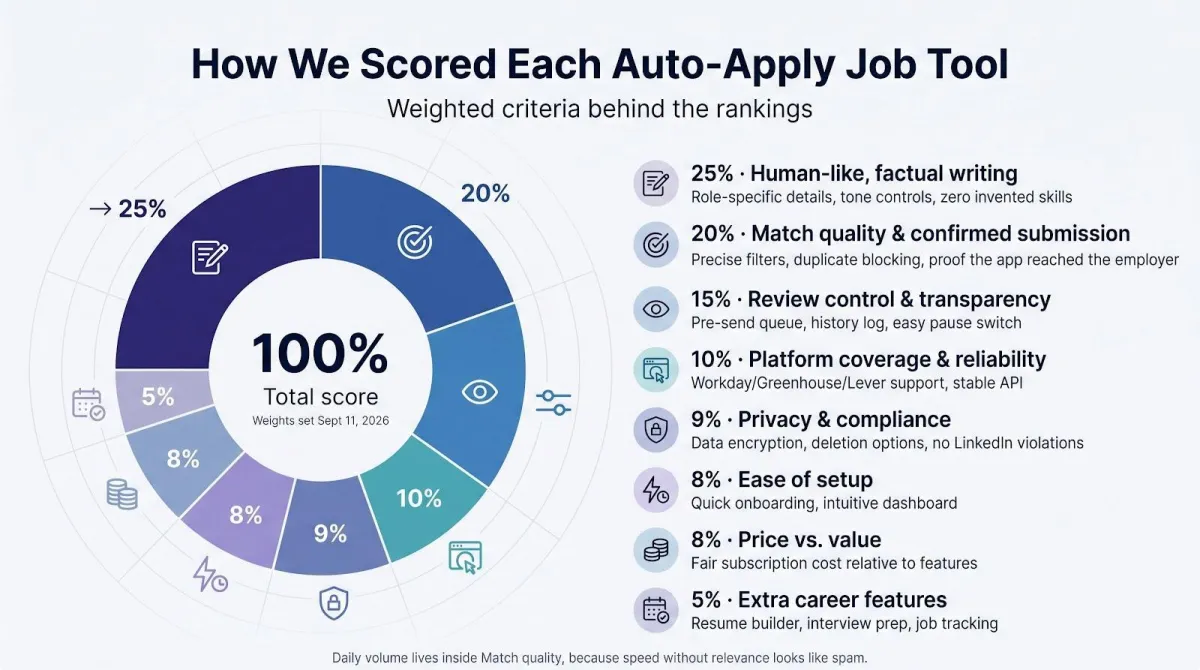
We scored each platform on eight factors that come up most often in job-seeker forums and recent studies. The weights below were set on September 11, 2026 and will be updated when fresh data arrives.
| Criterion | Weight | What earns a high score |
| Human-like, factual writing | 25 percent | Role-specific details, tone controls, zero invented skills |
| Match quality & confirmed submission | 20 percent | Precise filters, duplicate blocking, proof the app reached the employer |
| Review control & transparency | 15 percent | Pre-send queue, history log, easy pause switch |
| Platform coverage & reliability | 10 percent | Stable support for major ATS portals like Workday, Greenhouse, Lever |
| Ease of setup | 8 percent | Under ten-minute onboarding, clear UI, minimal OAuth hops |
| Price vs. value | 8 percent | Cost to send 100 job-specific applications, including mandatory add-ons |
| Privacy & compliance | 9 percent | Data encryption, deletion options, no LinkedIn auto-click violations |
| Extra career features | 5 percent | Interview prep, trackers, follow-up reminders |
We placed maximum daily volume inside “match quality” because speed without relevance looks like spam.
Auto-apply, autofill, swipe-to-apply, and full agents are not the same thing
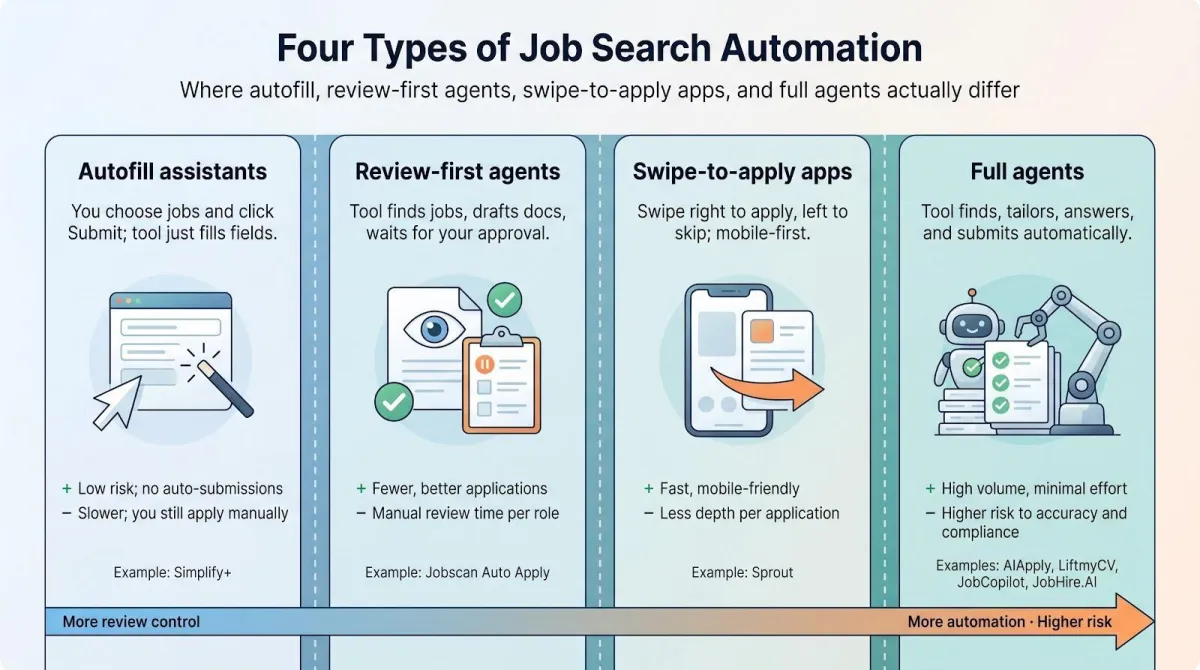
Many products blur “AI” and “automation,” yet job-search workflows fall into four clear lanes. Knowing which lane a tool drives in keeps you from buying a screwdriver when you need a drill.
1. Autofill assistants
Store your profile once, then paste it into repetitive fields on Workday or Lever. Simplify+ lives here. You still choose the job, answer final questions, and press Submit, saving minutes instead of hours.
2. Review-first application agents
Search, pre-fill, and draft documents in the background, then wait for your approval. Jobscan Auto Apply is the best-known human-in-the-loop model.
3. Swipe-to-apply apps
Present each posting as a card on your phone. A right swipe triggers a résumé and cover letter, then submits the form in the background. Sprout owns this mobile niche.
4. Fully autonomous agents
Match roles, rewrite résumés, generate cover letters, answer screening questions, and submit applications, often dozens per day. AIApply, LiftmyCV, and JobHire.AI offer pause or hybrid modes so you stay in control.
Why the difference matters
Control and risk rise together. Autofill saves time but cannot misspell your name. Review-first doubles reach with eyes on every document. Swipe-to-apply trades depth for convenience. Full agents unlock volume but raise the stakes for accuracy, privacy, and platform compliance.
If you never want an application sent without your sign-off, a full agent, no matter how shiny, may feel like letting a stranger sign your name.
1. AIApply: best overall end-to-end application system
Looking for one platform that not only finds roles, custom-writes documents, and submits applications but also claims to boost interview rates by up to 80 percent? AIApply delivers that full stack. Its pricing splits into a subscription and separate Auto Apply credits, so read the checkout screen once before you start.
Control and volume. You set the roles, locations and companies to target or avoid, and you can change those filters at any time. You choose how much to hand over: review each tailored draft before it goes out, or let Auto Apply submit on its own in the background. Volume is bought as credits, one per application, so there is no fixed daily quota to hit.
What goes out the door. Each application includes a fresh, job-specific résumé and cover letter that reference the company’s product line, tech stack, and your quantifiable wins. AIApply’s own FAQ says the output is built to read as professional and natural, “not robotic or generic,” and the documents are fully editable before they go out, so budget a minute per application to trim openers and buzzwords.
After submission. The dashboard logs every application with the company, the date and the exact résumé version that went out, so you can pull up what a recruiter saw when the call comes in.
Pricing shape. AIApply splits the cost in two: a subscription for the résumé, cover letter and interview tools, and Auto Apply credits bought in packs of 100 or 250. One credit is one application, the tailored résumé and cover letter are included in it, and unused credits never expire, so a paused search does not waste what you bought.
Bottom line. Deep document customization, adjustable automation, and a full audit trail put AIApply on top, provided you’re willing to navigate its modular pricing.
2. LiftmyCV: best for flexible automation modes
If you want to turn automation up or down when you need to, LiftmyCV is the most configurable service on this list.
Modes and control. Choose Autopilot (fire-and-forget), Copilot (draft-then-review), or Custom Auto-Apply for granular filters and field-level rules. Switch modes with one click, so you can run low-risk applications in the background while keeping dream jobs in manual review.
Per-job documents. LiftmyCV creates a new résumé and cover letter for every posting from the job description plus your profile, and you can preview both in Copilot mode before anything is sent.
Pricing in Lifts. A standard auto-apply costs one Lift, AI résumé generation or Stealth Apply two or three, and you are charged only for successful submissions. The first apply is free; buy Lifts pay-as-you-go, on a Basic monthly subscription, or go Unlimited. The site quotes about $0.05 per auto-apply and under $0.01 on Unlimited; check the app for current pack and plan prices.
Coverage. LiftmyCV lists 12-plus job boards and ATS platforms, including LinkedIn, Greenhouse, Lever, Ashby, Workable, SmartRecruiters and Recruitee.
Missing pieces. LiftmyCV keeps an auto-apply history with the job description and the résumé used, but it does not offer live interview support, so pair it with a separate prep tool.
Ideal user. Choose LiftmyCV if you want to experiment with automation at your own pace, need per-job documents, and don’t mind translating Lifts into real dollars.
3. Jobscan Auto Apply: best for review-first ATS optimization
If you want every application held for approval before it leaves your screen, Jobscan Auto Apply is the safest path.
Workflow. Jobscan scans new postings that match your saved criteria, drafts application answers, and pairs them with a résumé tuned to that ATS. Nothing is sent until you click Submit. That single checkpoint stops hallucinated skills or salary numbers before they reach an employer.
ATS advantage. According to Jobscan, users who act on their scan results get up to three times more interviews because they fix the exact keywords and formatting that applicant tracking systems prioritize.
Speed and limits. Because each application requires a credit and manual review, the tool is built for a few well-matched applications a day rather than hundreds.
Pricing. Auto Apply lives inside Jobscan Premium ($49.95 per month or $89.95 per quarter). The plan includes two free Auto Apply credits each month, and extra packs start at 5 credits for $8.50.
Choose Jobscan Auto Apply when quality outranks volume, and you’d rather catch errors yourself than explain them later.
4. Sprout: best mobile-first swipe-to-apply experience
If you prefer job-hunting on your phone, Sprout turns postings into Tinder-style cards: swipe right to apply, swipe left to skip.
How it works. Upload a résumé once; every right-swipe triggers Sprout to create a job-specific résumé and cover letter, then submit the form in the background. You can enable Manual Review to park swiped jobs in a queue until you approve them.
Applications, not credits. Plans are priced by monthly application count: Basic $19.99 for 80, Pro $39.99 for 200, Ultra $79.99 for 600 (web prices, September 2026). Confirm at checkout, since store pricing can differ.
Coverage and reliability. Sprout supports major ATS portals such as Workday and Greenhouse.
Visibility. You can review and edit the résumé, cover letter and tone before each application is submitted.
Ideal user. Commuters and mobile-first job seekers who value convenience over deep desktop configurability. Skip Sprout if you need bulk desktop automation.
5. JobCopilot: best for consistent daily application volume
Need a predictable stream of applications every morning? JobCopilot schedules them like clockwork.
Plans and limits.
- Premium: up to 20 auto applications per day, about $0.93/day when billed quarterly.
- Elite: up to 50 per day, about $1.05/day on the same billing cycle.
Control options. Both tiers let you hold applications for review; Elite adds a tailored résumé for every application.
Writing depth. The cover letter builder is included, but per-job rewrites live only in Elite. Expect generic letters on the cheaper tier unless you edit.
Coverage. JobCopilot applies only on official company career pages and says it watches more than 500,000 of them, so board-only listings are out of scope.
Pricing quirks. The pricing page states that plan duration never expires; confirm what happens to unused volume before you cancel.
Ideal user. Choose JobCopilot if you want a steady, automated rhythm and are willing to pay Elite rates for fully personalized documents.
6. JobHire.AI: best for adjustable high volume
Want to send 40-100 applications per day yet keep a safety switch? JobHire.AI is built for that balance.
Approval modes. Pick Manual, 24-hour Delay, or Automatic, and change the setting at any time. Delay mode gives you a full day to cancel before an application goes out.
Pricing and volume.
- Basic: $49/month, up to 40 applications per day.
- Enhanced: $99/month, up to 100 per day.
Documents. Each application includes a refreshed résumé and an optional cover letter; add one personal detail before you switch on Automatic mode.
Guarantee caveat. JobHire’s headline promises an interview invitation within 15 days, and its FAQ says invitations usually start in 7 to 14 days. Read the refund terms before you count on it.
Privacy. Your answer library (salary, visa status and similar) lives on JobHire’s servers, so read the privacy policy before you fill it in.
Ideal user. Choose JobHire.AI if volume is the priority and you’re willing to skim drafts daily to keep quality high.
7. Simplify+: best for safe autofill and manual submission
Prefer to click Submit yourself but hate retyping forms? Simplify+ speeds up the chore while keeping you in control.
What it does. The free Simplify extension copies your saved profile into repetitive fields on Workday, Greenhouse, Lever, and other major ATS portals. You review every field, then press Submit.
Plus plan. Simplify+ adds AI-written résumés, cover letters, networking insights, and job-competitiveness analytics. Pricing as of September 2026, shown at in-app checkout:
- Weekly: $19.99
- Monthly: $39.99
- Quarterly: $89.99
Time saved. Simplify says its autofill saves hours a week on repetitive forms; the gain is largest on long Workday questionnaires.
Privacy edge. Because Simplify never submits on your behalf, it doesn’t store application credentials or risk violating LinkedIn’s anti-bot policy.
Caution. Plus drafts can read generic unless you add context; treat them as a starting point, not a final product.
Choose Simplify+ if you value precision and policy safety over background automation speed.
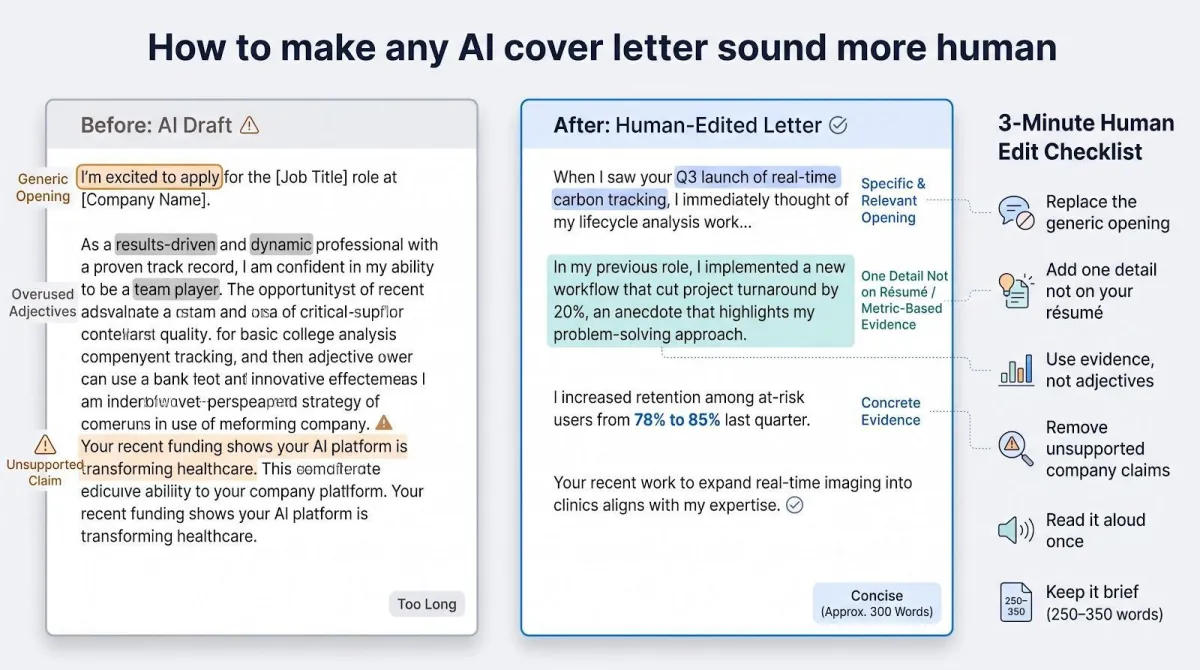
How to make any AI cover letter sound more human
Most AI tools write a good first 80 percent, but the final polish that hooks recruiters takes about three minutes of smart editing. In the next few sub-sections you’ll learn six quick fixes, starting with the biggest win: rewriting the opening line.
Replace the generic opening
Ditch filler like “I’m excited to apply.” Lead instead with one fact that shows you’ve read the posting, a recent product launch, a flagship program, or a published research breakthrough.
Example
When I saw Acme’s Q3 launch of real-time carbon tracking, I knew my lifecycle-analysis work at GreenMetrics could shave weeks off your data-collection loop.
A single, verifiable detail signals genuine interest and pulls you out of the template crowd.
Add one detail that isn’t on your résumé
A cover letter earns its space when it shares context recruiters won’t see in bullet points, a motive, a hurdle, or a quick metric that proves impact.
Example
I built the dashboard because our support team spent Fridays stitching CSVs by hand. Watching them leave on time for once was a bigger win than any KPI we tracked.
That single anecdote shows you notice operational pain, rally teams, and measure success in human terms, traits no list of tools can capture. Keep it factual, brief, and memorable.
Use evidence, not adjectives
Buzzwords like “results-driven” or “dynamic” cost nothing, and recruiters skim right past them. Replace them with numbers or concrete outcomes.
Step 1 Pick one recent win
Step 2 State the metric (percent, dollars, hours)
Step 3 Connect it to the job’s top goal
Example
Last quarter I rebuilt our churn-prediction model and raised retention among at-risk users from 78 percent to 85 percent, the same challenge you flagged for freemium engagement.
Now “results-driven” is a data point the reader can picture.
Remove unsupported company claims
Few things tank credibility faster than an obvious factual error. AI drafts can invent funding rounds, product launches, or growth stats, so budget a quick fact-check.
- Scan the employer’s About page, press releases, Crunchbase round history, or LinkedIn news tab.
- Delete or rewrite anything you can’t confirm in 30 seconds.
Example, before
Your recent Series C shows investors back your AI blood-diagnostics platform.
Reality: the firm is still Series B and builds imaging software.
Revision
Your July Series B funding signals investor confidence in bringing real-time imaging into community clinics.
Now every fact is defensible, and you avoid an instant “pass” from a detail-oriented recruiter.
Read it aloud
Your ear catches awkward phrasing your eye skims past. After you edit, read the letter out loud once, no exceptions. Trip on a line? Shorten it. Hit a tongue-twister? Reorder. Anything that sounds forced will feel forced to the reader.
The minute it takes beats any grammar checker at tightening flow and cutting filler.
Keep it brief
Most recruiters skim; a cover letter 250-350 words (about half a page) gets read, anything longer rarely does.
Structure it in three quick paragraphs:
- Why this company hooks you.
- One metric-backed win that proves fit.
- A polite close and call to action.
Everything else belongs on your résumé or in the interview. Short, specific, unmistakably you, that’s the sweet spot.
Conclusion
Auto-apply tools only earn their keep when the letters they send still sound like you. AIApply ranks first because it tailors a résumé and cover letter to every role, lets you review before anything goes out, and keeps a record of what each employer received. LiftmyCV and Jobscan suit people who want more control at each step, Sprout fits a phone-first search, JobCopilot and JobHire.AI trade depth for daily volume, and Simplify+ keeps the final click in your hands. Whichever you pick, spend three minutes on the edits above before you let the tool press Submit.
%20(1).png)
%20(1).png)
%20(1).png)
.svg)


.png)
.png)


.png)


