
.svg)
.svg)

PixVerse AI Review 2026: Features, Pros, Cons, and How to Use
AI video generation has become much more advanced in 2026. Instead of creating every scene manually, users can now start with a text prompt, image, reference, or existing clip and let AI build new video content. Pixverse AI Free has become one of the platforms, pulling in tens of thousands of monthly searches from creators comparing it against Sora, Kling, and Runway.
It's built by Aishi Technology and has grown quickly around a simple pitch of fast, stylish, affordable video clips from text or images. This review covers what pixverse ai video generator actually delivers in 2026, how to use it, and why MagicLight AI is worth considering if your project needs more than a short clip.
Part 1. What Is PixVerse AI?
The pixverse ai video creation platform is designed to help users generate and modify video content with AI. Users can create videos from text or images, transition between frames, extend existing clips, use reference images, add sound, synchronize speech, and change visual styles. Its V6 model is particularly notable in 2026 because it supports a large variety of AI tools.
Key Features
- PixVerse can create videos directly from written prompts or transform static images into moving videos. The image-to-video workflow lets users upload images and describe the motion and effects they want to add.
- PixVerse includes an Extend feature that continues an existing video by generating additional content from the ending portion of the clip.
- PixVerse's Fusion workflow allows creators to use reference images to guide subjects and backgrounds. This can help when a creator wants specific visual elements to appear consistently in the generated scene.
- PixVerse provides audio generation options and dedicated speech and lip-sync capabilities.
- PixVerse is not limited to generating a video from scratch. It also provides tools such as Restyle, Swap, Modify, Mimic, Sound Effects, and Lip Sync.
- The pixverse ai pricing lets users choose different generation options, but frequent high-quality video creation can use credits quickly.
Pros
- PixVerse gives users several ways to begin creating, including text prompts, images, first-and-last frames, and reference-based workflows.
- The platform provides options for duration, resolution, aspect ratio, audio, transitions, references, extensions, and visual styles, depending on the selected workflow and model.
- The Extend feature allows creators to continue an existing clip instead of always creating a completely separate video.
- Supported models can generate audio alongside video, while separate tools provide sound effects and lip sync.
- PixVerse V6 supports up to 15-second clips and up to 1080p resolution, making it suitable for short-form video creation.
Cons
- Although PixVerse provides video extension and multi-clip workflows, individual V6 generations are limited to 15 seconds.
- PixVerse uses credits for video generation, with costs changing according to model, duration, resolution, audio, and other settings.
Part 2. How to Use PixVerse AI?
Using PixVerse starts with choosing the type of video you want to create. The exact interface can change depending on the model and workflow, but the basic process is straightforward.
Step 1: Open PixVerse and Choose a Tool
First, go to the PixVerse AI website and log in to your account. After logging in, you will see different video creation tools. Choose the tool you want, such as Text to Video or another option that matches your idea.

Step 2: Add Your Prompt and Create
A new page will open with a space where you can enter your prompt. Write what you want to create and adjust any available settings or editing options. Once everything looks good, click Create to generate your video.

Step 3: Preview and Make Changes
Your video will appear after it has been generated. Preview it carefully to see if you like the result. If you want to make changes, you can use the available editing options or recreate the video with a different prompt.

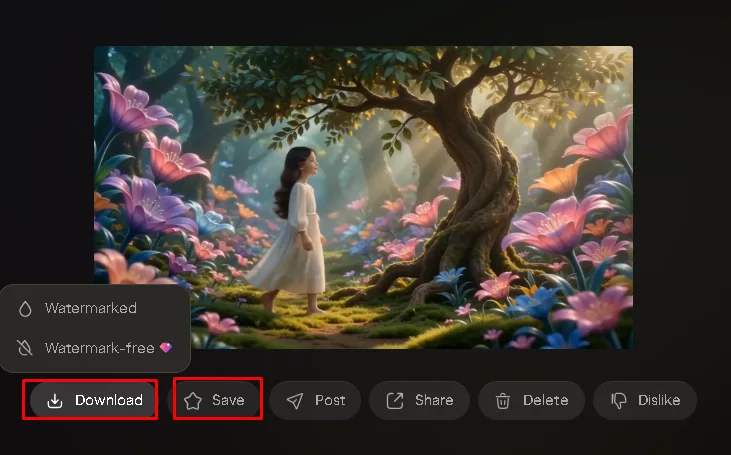
Step 4: Download Your Video
If you are happy with your video, look for the options below it. You can download, save, or delete the generated video. Click Download to save your final video and enjoy your creation.
Part 3. Why Magiclight AI Is the Best Alternative to PixVerse AI
PixVerse is excellent at producing quick, stylish clips, but its short output length and lack of deep narrative tools mean it isn't built for projects that need a real story arc. That's the gap MagicLight AI is designed to fill, turning a script or story idea into a complete, long-form video rather than a handful of short, separately generated clips.
Key Features
Long-Form Video Creation
MagicLight's Story to Video workflow supports videos of up to approximately 50 minutes. It also supports scripts of up to 12,000 words, allowing creators to work on longer storytelling projects instead of relying mainly on short individual clips.
Complete Production Pipeline
MagicLight can take creators from Idea → Script → Storyboard → Production Plan → Final Video. Its MagicLight Agent provides a conversation-style workflow that helps with script writing, storyboarding, character setup, visual style selection, production planning, and final video generation.
Consistent Characters
MagicLight maintains character consistency across multiple scenes. Creators can create or select characters and use them across a longer story, helping maintain a recognizable visual identity.
Automated Storyboards
MagicLight automatically creates storyboards that can be previewed before final video generation. Prompts can be edited and regenerated, while Nano adjustments can provide more detailed control over individual shots.
Multiple Video Production Options
MagicLight provides dedicated workflows for Story to Video, Kids Story Video, Music Video, Explainer Video, Character Vlog, Religious Stories, Short Drama, and Image to Video.
PixVerse AI | MagicLight AI | |
|---|---|---|
Best for | Short, stylized clips and social content | Long-form, script-driven narrative video |
Typical output length | Roughly 5–16 seconds per generation | Up to 50 minutes in one continuous project |
Audio | Native sound effects, music, dialogue, and lip-sync (V6) | Voice cloning and lip sync built into the storytelling pipeline |
Storytelling structure | Multi-shot sequences, templates, viral effects | Full scripts and story templates across a sustained narrative |
Credit/cost model | Pay per generation attempt, including failed ones | Credit-based, with free trial credits and no card required |
Conclusion
PixVerse AI earns its popularity honestly because of its fast, visually flexible, and low-friction approach for anyone who wants a quick, good-looking clip without touching a traditional editing timeline. It is built for seconds-long content, not a continuous story. MagicLight AI picks up exactly where that limitation starts, offering the script-to-video structure, character consistency, and long runtime that PixVerse doesn't attempt to provide.
FAQs on PixVerse AI
1. Can Pixverse AI Turn Images Into Videos?
Yes, pixverse ai image to video supports image-to-video generation. Users can upload a supported image and provide instructions describing the motion and effects they want. Also, MagicLight has a dedicated Image to Video workflow.
2. Does Pixverse AI Support Video Extension And Seamless Clip Continuation For Long Content?
Yes. PixVerse provides an Extend feature that uses the ending portion of an existing video to generate additional content. MagicLight's Story to Video workflow supports videos up to approximately 50 minutes, allowing creators to develop longer stories with scripts
3. What Are The Limitations Of The Pixverse AI Free Plan?
PixVerse uses a credit-based system, and available credits depend on the user's account and membership setup. Current documentation says daily credits renew at 0:00 UTC and expire at the end of the day, while monthly credits refresh according to the billing period.
4. What Are The Best Pixverse AI Alternatives?
The best alternative depends on what you want to create. For short AI video generation, PixVerse already provides a wide range of tools. For creators who want a complete long-form storytelling workflow, MagicLight AI is a strong alternative. MagicLight supports Story to Video projects up to approximately 50 minutes and scripts up to 12,000 words.
5. Can Beginners With No Video Skills Use Pixverse AI Proficiently?
Yes, beginners can start with PixVerse because its main creation workflows are based on straightforward inputs such as prompts and images. Users can choose Text-to-Video or Image-to-Video and then select generation settings before creating a clip. MagicLight is also designed to simplify the production process.

.png)
%20(1).png)
%20(1).png)
.svg)


.png)
.png)


.png)


